
Why This Tool?
I do forget a lot, so constant reminders are much needed. While exploring Starship Prompt I discovered that it can be customized to display text around the cursor. Hmm, I thought, 'What if I add reminders for the tasks I need to do above it?' IziDo was born out of this. For those who might find this feature annoying, don't worry—you can easily toggle it on and off. Check the code below...
Features
- Interactive Picker: Run
izidowith no arguments for a live, arrow-key-driven task browser — toggle, delete, and filter as you type. - Cloud Sync: Two-way sync with the Chrome Extension / macOS app via a Supabase backend. Instant-open from a local cache, background refresh keeps it fresh.
- Add Tasks: Priority levels, due dates, recurring rules (
daily/weekly/monthly), and#project/@contexttags — all from one command. - List & Filter: Filter by status (
pending/done), priority, or tag (izido list #core) with a color-coded, sorted table. - Manage Tasks: Mark done, reopen, remove, edit text/priority/due date, and undo the last change.
- Search & Stats:
izido find "text"for quick search;izido statsfor a breakdown by status and priority. - Calendar Export:
izido exportproduces a standards-compliant.icsfile — pending tasks land directly in Apple / Google / Outlook Calendar. - Guided Setup:
izido setupwalks you through API keys, mode selection, and tests the connection. - Prompt Integration: Display your to-do list directly in your terminal prompt using Starship.
- Toggle View: Enable or disable the prompt block with
izido on/izido off. - Cross-Platform: Runs on macOS and Linux. Bash 4+ recommended for the picker.
Demo View

Experience the sleek integration of iZiDo with your terminal prompt.
Installation
Prerequisites
- Shell: Bash or Zsh.
- Starship Prompt: Installed and configured.
- Utilities:
jq(for cloud mode),awk,sed. - Bash 4+ (optional — enables the interactive picker; brew-installable on macOS).
- Terminal Emulator: Supports Unicode and colors.
Quick Install
brew install starship jq bash               # dependencies
sudo cp izido-cloud.sh /usr/local/bin/izido
sudo chmod +x /usr/local/bin/izido
izido setup                                   # guided config
Steps
- Clone the Repository:
git clone https://github.com/idmtr/izido.gitcd izido - Install the Script:
sudo cp izido.sh /usr/local/bin/izidosudo chmod +x /usr/local/bin/izido - Configure Starship Prompt:
cat starship.toml >> ~/.config/starship.toml - Reload Your Shell:
source ~/.zshrc # For Zshsource ~/.bashrc # For Bash
Usage
Add a To-Do Item
izido add -p high -d 2024-11-01 "Go to dentist"Priority Options: high, normal, low (default
is normal).
Due Date Format: YYYY-MM-DD. If omitted, the due date is unspecified.
List To-Do Items
izido listizido list pending # List pending tasksizido list high # List high-priority tasksMarking a Task as Done
izido done 1Removing a To-Do Item
izido remove 2Clearing All To-Do Items
izido clearInteractive Picker
izidoRun without arguments to launch the live picker. Navigate with arrow keys, toggle with Enter, type to filter. Press q to quit.
Recurring Tasks & Tags
izido add -p high "Standup" daily
izido add "fix #core @desktop" weekly
Add daily, weekly, or monthly after your task to make it recurring. Marking done advances the due date. #project and @context tokens are color-coded and filterable.
Edit, Undo, Find & Stats
izido edit 1 -t "updated text" -p high
izido undo
izido find "bug"
izido stats
Calendar Export
izido export my-tasks.icsProduces a standards-compliant .ics file — pending tasks land in Apple Calendar, Google Calendar, or Outlook.
Cloud Sync & Setup
izido cloud          # switch to cloud mode
izido sync           # pull latest from backend
izido setup          # guided config wizard
Toggling To-Do View in Prompt
izido view onizido view offCustomization
Adjusting the Script
Modify the izido.sh script to better suit your workflow:
- Change Data Storage Format: Switch to JSON or another format if preferred.
- Add Features: Implement task editing, notifications, or integrations with other tools.
Modifying the Prompt Display
Customize how tasks are displayed in your prompt by editing the starship.toml
configuration:
- Change Icons: Replace Unicode icons with your preferred symbols.
- Adjust Colors: Modify color codes to match your terminal theme.
- Limit Task Display: Change the number of tasks shown in the prompt.
Contributing
Contributions are welcome! Follow these steps to contribute:
- Fork the Repository
- Create a New Branch
git checkout -b feature/YourFeatureName - Commit Your Changes
git commit -m "Add feature: YourFeatureName" - Push to Your Fork
git push origin feature/YourFeatureName - Open a Pull Request detailing your changes and their benefits.
Beyond Coding
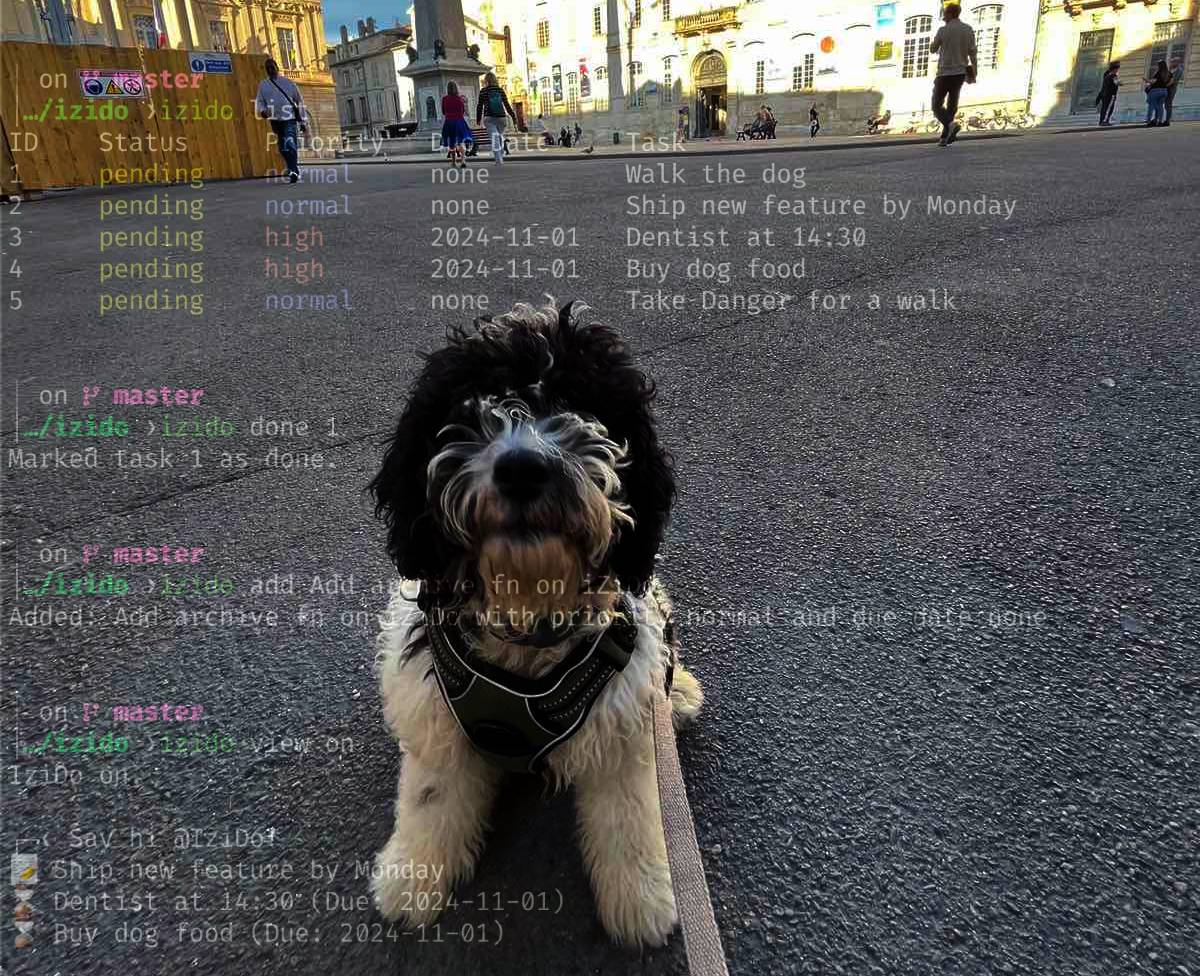
Yes, iZiDo even helps me take my dog for walks!
Origin of the Name
iZiDo is a playful twist on the phrase "Easy Do", reflecting the application's core mission to simplify task management directly from your terminal. The name embodies the ease and efficiency that iZiDo brings to your daily workflow, making task tracking an effortless part of your coding environment.
Dialect and Slang Origins
The term "iZi" is a colloquial contraction of "easy" commonly found in various English dialects and informal speech. By adopting this slang variation, iZiDo conveys a sense of casual simplicity and approachability, inviting users to integrate task management seamlessly without disrupting their coding flow.
- "iZi": Represents the ease of managing tasks.
- "Do": Emphasizes action and productivity.
Together, iZiDo suggests that handling to-dos can be both straightforward and effective, aligning with the application's goal to help you get stuff done.
License
This project is licensed under the MIT License.